
There's no better printer for small spaces like desks or home offices than the best compact printers. Some are even battery-powered, so you can print wherever you go. With so many options on the market, it can be hard to choose the right one. This guide has a list of the best compact printers to help you decide which is correct.
Consider what features you'll need if you're looking for a multipurpose printer with copying and scanning capabilities. Will you print family photos, or will your kids use them for homework? Do you need a portable printer?
Compact printers now offer many valuable features, such as WiFi, photo printing, and scanners, so you don't have to buy several devices. That's why it's worth investing in the best all-in-one printer. Lastly, compare technical specifications such as printing speed, paper size, and connectivity to find the one that's right for you.
These are the best compact printers, but if you want more kit, check out our guide to the best home computers.
The best compact printers we recommend in 2025
Why you can trust Top Ten Reviews Our expert reviewers spend hours testing and comparing products and services so you can choose the best for you. Find out more about how we test.
Top Ten Reviews is on a mission to review everything we feature in our buyer's guides. Still, while we work hard to make this a reality—or where this isn't possible—some of our guides still feature rankings based on our team's considerable expertise and research.
While we haven't been able to test any of the units in this guide in person, we've instead honed in on top-rated brands and used our knowledge of the best features to help you make the right decision for your home, all for the best price.
The best compact printer overall
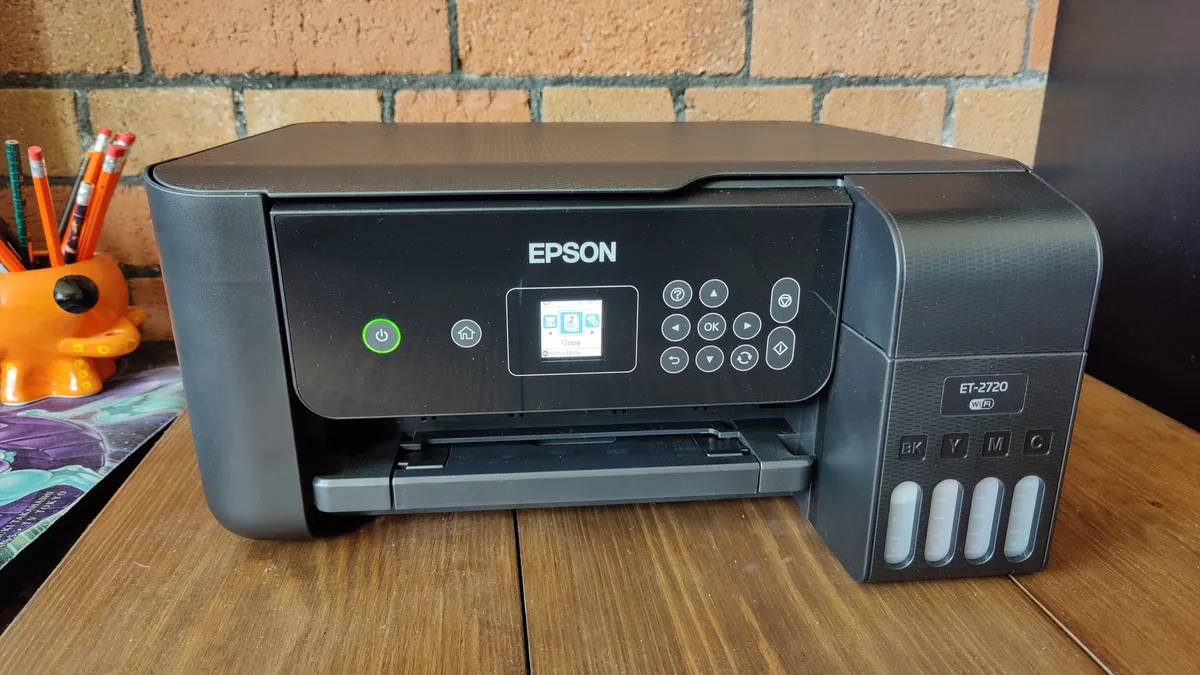
You can't go wrong with the Epson ET-2720 if you're looking for a compact home printer. Once our reviewer, Ian, unfolded the printer tray, it extended slightly, but overall, it fits nicely on his desk without feeling bulky. It's pretty space-efficient when it's not in use, measuring 14.8" x 13.7" x 7.0", and has a black matte finish.
Ian liked the adjustable control panel with an LED screen and accessible buttons. He could also check ink levels through the transparent ink tanks.
While the ET-2720 lacks features like autofocus and auto duplexing, which are available in other printers for a similar price, it offers some appealing features. This printer uses refillable ink bottles instead of cartridges, which is cost-effective and reduces waste. The voice-activated Alexa printing makes it feel futuristic and convenient. Refilling it is easy, thanks to detailed instructions.
He was also impressed with the print quality. Text is sharp and clear, and while it's not a dedicated photo printer, it handles occasional photo prints exceptionally well. The color accuracy is also impressive, making images vibrant and true to life.
Read more: Epson EcoTank ET-2720 Wireless All-In-One Printer review
The best budget compact printer

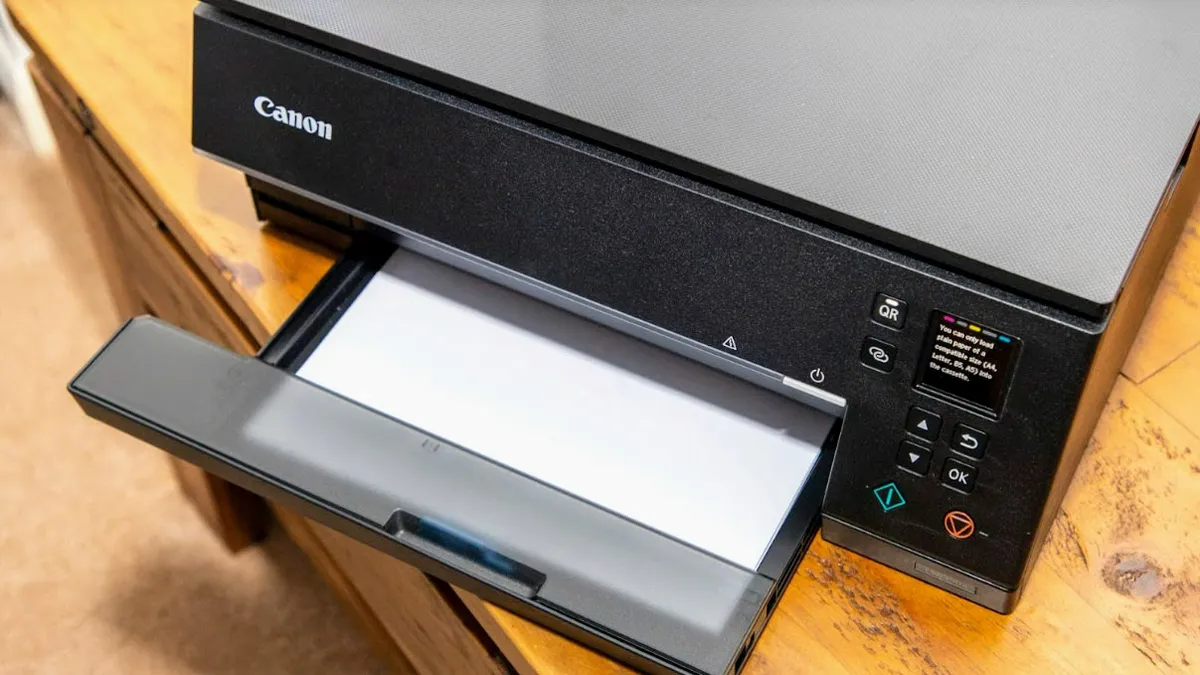

The Canon PIXMA TS6320a can print A4-sized documents at a maximum resolution of 4800x1200 dpi. My favorite feature is that it can print borderless 10x15cm pictures. The built-in scanner has a resolution of 1200x2400 dpi, so you can easily scan documents and photos.
This printer has a five-ink system that includes Magenta, Cyan, Yellow, standard black, and pigment black. With this setup, my text is sharp and bright, and Canon says the ink cartridges will last up to 100 years. Thanks to Canon's FINE technology, I'm guaranteed a fresh inkjet nozzle with every new cartridge.
The dual paper trays are a game-changer. I can load 100 sheets in the front cassette and 20 glossy photo sheets in the rear cassette, so I can switch between different media types without constantly refilling them. Besides saving time, double-sided printing is also good for the environment.
The print quality was excellent. I tested it on various projects, and the text was incredibly sharp. When you printed with the extra pigment black, it was like laser printer quality. In both cases, Canon Matte and Canon Photo Paper Plus Glossy II produced vibrant colors, especially on glossy paper, where the blacks were deeper and the details were better. Although I was disappointed with the thin white border on A4 photos, I did wish I could print them borderless.
My experience with a full-color A4 image on matte paper took about 1 minute and 15 seconds, even though Canon claims 10 images per minute for color. I like the print times for essential documents and photos, especially for their quality.
Read more: Canon PIXMA TS6320 Color All-In-One Inkjet Printer review
The best premium compact printer


The Epson PictureMate PM-400 compact printer is designed for photo enthusiasts like our reviewer, Jessica, who want quality prints without the hassle of complicated setups. One of the first things she noticed was it uses a single ink cartridge containing all four colors. For a snapshot printer, the cost per photo is just 33 cents, but refill packs cost around $32.99 and yield about 100 photos.
Jessica loved that the PM-400 could print larger photos in addition to the standard 4 x 6. This allows her to make smaller keepsakes that fit nicely in small frames. Although it works with other brands of photo paper, she stuck with the bundled packs. The iPrint app was easy to use on her smartphone or tablet to print with Wi-Fi Direct, so she no longer needs a computer.
Jessica loved the sharp detail, even under magnification. The printer produced stunning, high-resolution prints at 5760 x 1440, with vibrant colors and lifelike skin tones. She found the PM-400, one of the fastest printers she's used; it prints 4 x 6 in 39 seconds. Her only issue was a pinprick-sized void on one print, but the results were almost perfect.
Because the PM-400 doesn't have a battery, it's not portable, but its lightweight design makes it easy to take wherever you go. The built-in display is a nice touch for standalone printing, and Jessica found the overall user experience very user-friendly. Jessica says the PictureMate PM-400 is a superb photo printer.
Read more: Epson PictureMate PM-400 Wireless Photo Printer review
The best compact printer for home offices


The Canon PIXMA TR150 is a fantastic portable printer. One of its remarkable features is the ability to print directly from our reviewer, Andy's smartphone or tablet. The dedicated Canon PRINT app, AirPrint, and Mopira support made it easy for him to access his photos on the go.
Setting it up was easy, thanks to its compatibility with Windows 11. The 1.44" display is a nice touch, providing essential information without taking up much space. Andy mainly prints through WiFi, but Wireless Direct lets him print away from a network.
Although small—just 12.7"x 7.3" x 2.6" and only 4.5 lbs—it's sturdy enough to travel with. It expands when the front tray and paper feeder are removed, making it perfect for Andy's small home office. It fits easily in a drawer and is lightweight to carry around.
Printing at 4800x1200 dpi produces stunning photos, and although it has limited print settings for double-sided prints, it excels in color vibrancy and quality printing.
It prints up to nine pages per minute in black and white and up to five pages per minute in color. Using different kinds of paper made the experience much better. Color prints, especially on glossy A4 sheets, were vibrant and perfect for capturing memories.
Despite the pricey ink, Andy still considers the Canon PIXMA TR150 a solid choice for anyone looking for a reliable photo printer for travel or small projects.
Read more: Canon PIXMA TR150 Wireless Inkjet Printer review
The best mini photo printer


The CP1500 has a maximum print size of 6x4” and a resolution of 300x300dpi, the same as its predecessor, the CP1300. However, it takes 41 seconds to print a 6x4" image on the CP1500, compared to 47 seconds on the CP1300. The CP1500 took about 57 seconds on average, while the older model took about 63 seconds. Even though there's a slight improvement, both took a lot longer than expected.
My favorite feature is that it's compatible with SD, SDHC, and SDXC memory cards. With the WiFi connectivity, I could print directly from my camera's memory card and use the Canon PRINT Inkjet/SELPHY app alongside AirPrint and Google Mopria.
Canon replaced the USB-A and USB-mini ports with USB-C ones. While this modernizes the printer, it may not cater to users with older devices, and I'd have preferred keeping the old ports alongside the new option. An adapter could solve this problem, but one doesn't come with the printer.
Although the CP1500 has a slightly bigger LCD screen, I found the fixed position hard to view comfortably from a seated position.
Both printers produced excellent prints. The CP1500 made blue skies look slightly more vivid, which was a nice touch. Because dye-sublimation technology prevents ink clogging, I'm impressed with how long these prints can last.
Read more: Canon SELPHY CP1500 Wireless Compact Photo Printer review
How to choose the best compact printer for you
Size: It might go without saying that size is a primary concern when picking the best compact printer, but not all are created equal. As such, it's worth reading the exact sizing to ensure the model fits where you need it and there is enough room around it to load paper and print it out. This can also apply to paper size limits, so be sure you know what top-end size limits you can afford to take. The look is also worth considering if this will live front and center on your desk – with quite a few color choices to pick from.
Screen: Do you need a screen? Some offer screens for quick controls, but many now use an app or the device you're printing from to manage controls. For example, if you choose a model with an SD card slot, you may want a screen to print directly from that memory card, which is ideal for photos.
Print quality and capabilities: Do you need high-quality photos, or will you mainly use the printer for documents with odd images? Be sure not to overspend on a photo printer-grade model if you won't use that feature.
Connectivity options: Connectivity is worth considering as many offer WiFi, Bluetooth, and wired connections so that you can print from lots of different devices, including your smartphone – from anywhere. That print speed may also be a need for you, so take a look at both the black and white and color speeds to be sure this will serve your needs. Some also offer a quiet mode that's great for printing while on a call or at night.
Running costs: Longer-term costs are worth considering, such as the type of ink cartridges you'll need to replace or whether the printer has an ink tank for topping up. Whatever the case, check the company's rates and third-party options on ink costs before you commit to a particular brand. Some printers cost more upfront, but ink is cheaper in the long term, and vice versa.
Compact printer FAQs
How much does a compact printer cost?
The best compact printers are more expensive than regular all-in-one printers because they offer several extra features. In addition to portability and wireless features, you must factor in the cost of batteries and replacement ink. Moreover, because the stock is relatively scarce, we've seen retailers increase the price of some printer models.
Compact printers start at around $100 for budget models from reputable brands like HP and Canon, and they can cost more than $500 for the most feature-packed or ultra-portable models.
We've been reviewing compact printers for years, and we think that for around $200, you'll get a decent model that offers both portability and good-quality printing without compromising on essential features.
What smart features do compact printers have?
Over the past few years, the best compact printers have gotten a little brighter. Whereas printers used to be plugged into home computers to enable them to print, many now work wirelessly and can even connect directly to smartphones and tablets to print directly from these smart devices.
Some compact printers can also print via voice commands, and many are now compatible with Amazon Alexa and Google Assistant.
Because some printers can operate via a rechargeable battery, they are genuinely portable, enhancing their innovative WiFi features. In theory, a printer that has built-in smartphone printing and operates via a rechargeable battery could be taken to any location and used to immediately print off documents from your phone. It is ideal for anyone who travels for work, for example.
What kind of ink do compact printers use?
Almost all the compact printers on our list are inkjet printers, which use cartridges as their primary ink source. While you can get tank printers, which allow you to buy ink in bottles to fill a central reservoir in the printer, smaller nature of these printers means that most of them employ a cartridge system.
There are a few exceptions, though. The ultra-portable BrotherJet Pocket prints without ink, impressing your document onto a special thermal paper. While this may suddenly seem like a more cost-effective option, be aware that thermal paper is expensive, and the print quality is essential and very limited on printers of this type.
You don't tend to get compact laser printers, as their primary technology is ink. Laser printers are larger, more efficient models.

